 Video To Audio
Which MP3 bitrate should you use? 320, 192, 96 or 64 kbps
Bitrate is the one setting that decides both how an MP3 sounds and how big it is. The right number depends on what the audio is for: a song you want to keep, a two-hour lecture, a ringtone or a clip you are about to send in a chat. Here is how to choose, with the sums worked out.
Short answer
- Music you want to keep: 320 kbps, stereo, 44.1 kHz — about 2.4 MB per minute.
- Ringtones and everyday music: 192 kbps, stereo — about 1.4 MB per minute.
- Podcasts, lectures, voice: 96 kbps, mono — about 0.7 MB per minute.
- Sending quickly over chat: 64 kbps, mono — about 0.5 MB per minute.
Whatever you pick, the MP3 cannot sound better than the audio inside the original video.
1. What bitrate means, and how to work out file size
An MP3's bitrate is the number of kilobits used to store each second of sound. At a constant bitrate the file size follows directly:
Size in MB ≈ bitrate in kbps × duration in seconds ÷ 8 000. A 4-minute song (240 s) at 192 kbps is 192 × 240 ÷ 8 000 ≈ 5.8 MB.
| Bitrate | Per minute | 4-min song | 1-hour talk |
|---|---|---|---|
| 320 kbps | 2.4 MB | 9.6 MB | 144 MB |
| 192 kbps | 1.44 MB | 5.8 MB | 86 MB |
| 128 kbps | 0.96 MB | 3.8 MB | 58 MB |
| 96 kbps | 0.72 MB | 2.9 MB | 43 MB |
| 64 kbps | 0.48 MB | 1.9 MB | 29 MB |
| WAV (uncompressed) | ≈ 10.6 MB | ≈ 42 MB | ≈ 635 MB |
Figures use 1 MB = 1 000 000 bytes; your file manager may show slightly smaller numbers. WAV is 16-bit stereo at 44.1 kHz.
2. Why a higher bitrate cannot fix the source
The sound inside a video is almost always compressed already, usually as AAC. Converting it to MP3 decodes that audio and encodes it again. Choosing 320 kbps gives the encoder more room, so it throws away less of what is left, but it cannot bring back detail the original compression removed. A soundtrack that was recorded on a phone at a noisy event will still sound like that at 320 kbps, just in a bigger file.
Two practical rules follow:
- For music worth keeping, 320 kbps is the safe choice because it adds the least damage of its own.
- For speech, extra bitrate buys almost nothing you can hear. Spend it on clarity instead: mono and a steady level.
If you need the soundtrack exactly as it is, the Extract audio screen has an Extract original audio (no re-encoding) option that copies the stream as is (Premium). The file keeps its original format rather than becoming an MP3.
3. Mono or stereo? 44.1 or 48 kHz?
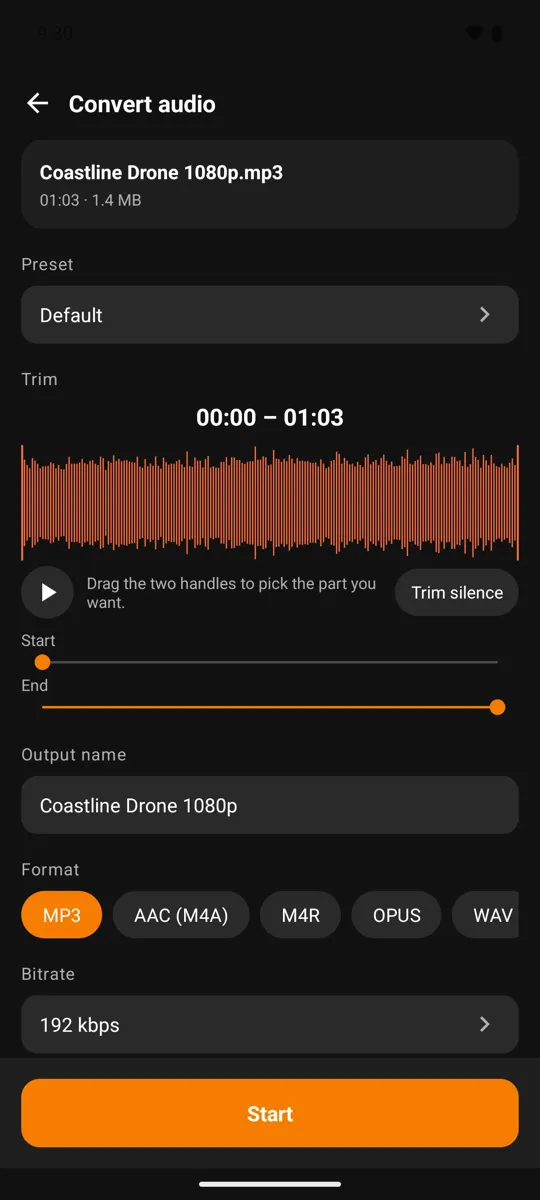
Mono stores one channel instead of two. For a single voice there is nothing to lose, and the whole bitrate goes to that one channel, so 96 kbps mono sounds as clean as a much larger stereo file. Keep stereo for music, where instruments are placed left and right.
Sample rate is how many times per second the sound is measured. 44.1 kHz is the music and CD standard; 48 kHz is the standard for video, so most video soundtracks already use it. Both capture everything people can hear. When in doubt, leave it on Same as source to avoid a needless conversion.
4. Normalizing loudness and fades
Normalize loudness adjusts the overall level so a quiet recording becomes easy to hear and different files play at a similar volume. It suits speech, ringtones and clips you share. For music you archive, keeping the original level preserves the loud and quiet parts as the artist mixed them.
A fade ramps the volume in or out over a fraction of a second. After a cut, it stops the audio starting or ending with an abrupt click, which is exactly what you hear when a ringtone is trimmed mid-note.
5. The four export profiles in the app
Most people know the goal, not the numbers. So instead of asking you to set five options, the Audio studio in Video To Audio & Mp3 Cutter offers four Smart export profiles. Tap one and it applies these settings, then opens the video picker:
| Profile | Bitrate | Channels · rate | Loudness | Fade in / out |
|---|---|---|---|---|
| Music archive | 320 kbps | Stereo · 44.1 kHz | Original level | — / 0.25 s |
| Podcast / voice | 96 kbps | Mono · 48 kHz | Normalized | 0.1 s / 0.1 s |
| Ringtone | 192 kbps | Stereo · 44.1 kHz | Normalized | 0.25 s / 0.35 s |
| Quick share | 64 kbps | Mono · 44.1 kHz | Normalized | — / — |
All four export MP3. The profile is saved as your Last used preset, so the next conversion starts from the same settings, and you can still change anything on the Extract audio screen before you tap Start. The Music archive profile uses 320 kbps, which costs a credit per file on the free plan and nothing with Premium; the other three are free.
Don't see the profile cards yet? They are arriving with the next update of the app on Google Play. Until then, the table above has every value, so you can set the same thing by hand before you tap Start. The app remembers your last settings, and Premium can also save them as a named preset with Save as preset….
6. Frequently asked questions
Is 320 kbps MP3 better than 192 kbps?
It keeps more detail, and the file is two-thirds larger. On phone speakers and ordinary earbuds most people find the difference hard to hear, so 192 kbps is a sensible default and 320 kbps is for music you want to keep.
What is the best bitrate for a podcast or lecture?
96 kbps in mono. Speech has no stereo image to preserve, and a mono file at that rate stays clear while an hour takes about 43 MB.
What bitrate should a ringtone be?
192 kbps stereo is plenty for a 20 to 30-second clip, with loudness normalized and short fades so it does not click at the start or end.
Will converting to a higher bitrate improve the sound of a video?
No. The video's audio is already compressed. A higher bitrate avoids adding extra loss but cannot restore what was removed.
Should I use 44.1 kHz or 48 kHz?
Either captures the full range of human hearing. 44.1 kHz is the music standard and 48 kHz the video standard. If you are unsure, keep the source's rate.
Pick a goal, not a number
Video To Audio & Mp3 Cutter is free on Google Play for Android 8.0 and newer.
Get it on Google Play